

A latency check is different from a full speed test
A latency check in a proxy list usually sends a small number of requests to estimate delay. A throughput test showing Mbps or MB/s moves enough data to estimate transfer speed. Seeing little allowance change after a latency check does not mean a full test across every node is free.
The test also has to travel through the route you intend to evaluate. In a rules-based configuration, a speed-test site might be sent directly rather than through the proxy. The result would describe that direct path and should not be used to judge the proxy node. Before starting a costly test, inspect the client's connection or routing record for the test destination. If you cannot tell where it went, keep the existing rules and consult the English Hiddify connection guide rather than changing several settings at once.
Estimate data from average speed and duration
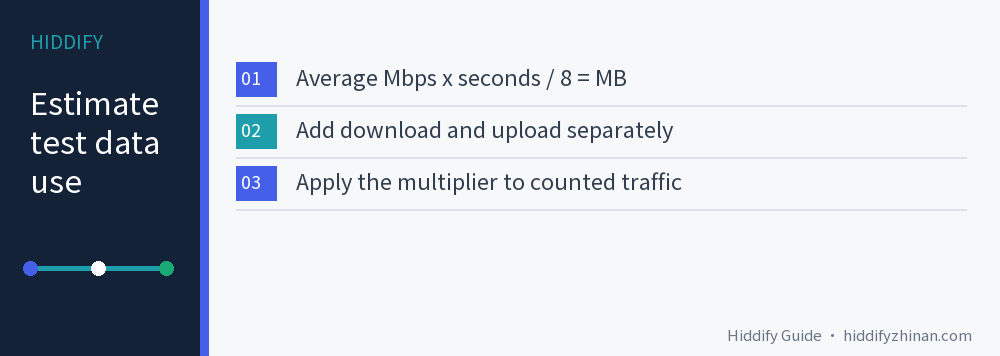
With decimal units, transferred MB ≈ average Mbps × seconds ÷ 8. The small b in Mbps means bits; the capital B in MB means bytes. If the tool reports MB/s instead, multiply that rate by seconds without dividing by eight. Use the average during each transfer, not the highest number that briefly flashes on screen.
- Choose an expected average download rate and duration from a previous result or a cautious assumption. Multiply Mbps by seconds, then divide by eight to estimate MB.
- If the tool also uploads, calculate its average upload phase separately and add the two transfers.
- If the provider counts traffic through the selected proxy and applies a node multiplier, multiply the counted total by that factor. Otherwise, keep transfer volume separate from any plan deduction.
Here is a hypothetical two-part test. No live speed test was run for this example.
| Phase | Average speed | Duration | Estimated transfer |
|---|---|---|---|
| Download | 100 Mbps | 20 seconds | 250 MB |
| Upload | 20 Mbps | 10 seconds | 25 MB |
| Total | Calculated separately | 30 seconds | 275 MB |
If both directions count and all 275 MB pass through a node with a fixed 2× multiplier, the plan might deduct about 550 MB, or 0.55 GB using decimal units. Four identical tests would be about 2.2 GB. Those are estimates under stated assumptions, not a promise about a provider's accounting. If the multiplier changes with the selected node, or the network rate varies, calculate again.
Preparation traffic, extra requests and delayed or differently rounded provider accounting can change the displayed difference. If the test tool gives actual upload and download byte counts, prefer those values over a calculation from speed. The Chinese guide to node multipliers gives more detail if your plan has a multiplier; the linked page is in Chinese.
Set a sensible limit before testing
Decide what you need to learn. To find out whether a particular website works, try that real task first. To compare two proxy nodes' sustained transfer performance, use the same tool and target for both. Running every node to full speed can consume substantially more data without answering a better question.
Test tools do not all have the same limits. M-Lab's discussion of NDT data limits describes a download cap that a client can choose to use. It is not a guarantee that every NDT client or another speed-test tool will stop at that amount. Read the tool's current settings; if it allows a duration or data cap, set one that fits your allowance.
If the tool offers no clear limit and little data remains, skip a full throughput test. Compare whether your usual site opens or how the same short video segment behaves instead. Stopping a test partway cannot give back bytes already transferred. For choosing a route inside Hiddify, the English proxy selection guide covers that separate task.
Check the provider's usage after the test
Record the account's used or remaining data before and after, along with the time, chosen node and multiplier. Pause your own large downloads and make sure another device is not using the account heavily during the comparison. Allow for the provider's stated reporting delay before interpreting the difference. A balance that has not updated yet is not evidence that the test used no data.
If the speed test completes through the proxy route and the provider's eventual usage roughly matches your conditional estimate, record the result and stop once it answers the comparison. If that comparison fails, stop further tests and check the route, multiplier and background data before blaming the node.
Before choosing M-Lab NDT, read its measurement and data policy: M-Lab collects IP addresses and measurement results and publishes test data. This article only explains the policy; it did not start a test on your behalf.
Once you have enough information to choose a node, stop testing. If a low latency figure looks good but ordinary pages remain slow, follow the Chinese low-latency, slow-speed comparison guide, clearly in Chinese, or return to the English Hiddify article index for another task. The useful number is the allowance you are prepared to spend for a meaningful comparison, not a universal “cost per test.”
Common questions
Does a Hiddify latency check use as much data as a speed test?
Usually no. A latency probe uses small requests to estimate delay; a throughput test transfers data for a sustained period. Neither is literally zero bytes, and the provider's accounting and route still matter.
Does the provider count both upload and download?
That depends on its plan rules. Estimate each direction separately and add only the directions the provider counts. Then apply the multiplier to the eligible traffic. If the rules are unclear, ask the provider before treating the 2× example as your bill.
Is 100 Mbps for 20 seconds always 250 MB?
It is about 250 MB for the download phase when 100 Mbps is the average for the full 20 seconds and decimal units are used. Upload, setup traffic, changing rates and accounting differences can increase or alter the total.